The Game Loop — your game's heartbeat 💓
You've reached the last stage. The Game Loop is the invisible rhythm under every video game ever made — a tiny piece of code that repeats 60 times every second, reading your keys, moving stuff, checking hits, drawing the new frame. Once you see it, you'll spot it in every game you play.
🧠 Quick Recap (30 seconds)
Before we dive in — can you remember from Lesson 9 (Helpers)?
Q1. What's a helper function?
A small named block of code you write once with def and call by name as many times as you like. Like a recipe: write it once, use it forever.
Q2. What does the global keyword do?
It tells Python: "when I change this variable inside the function, change the MAIN one outside — don't make a brand-new one trapped in here." Crucial for things like score and lives.
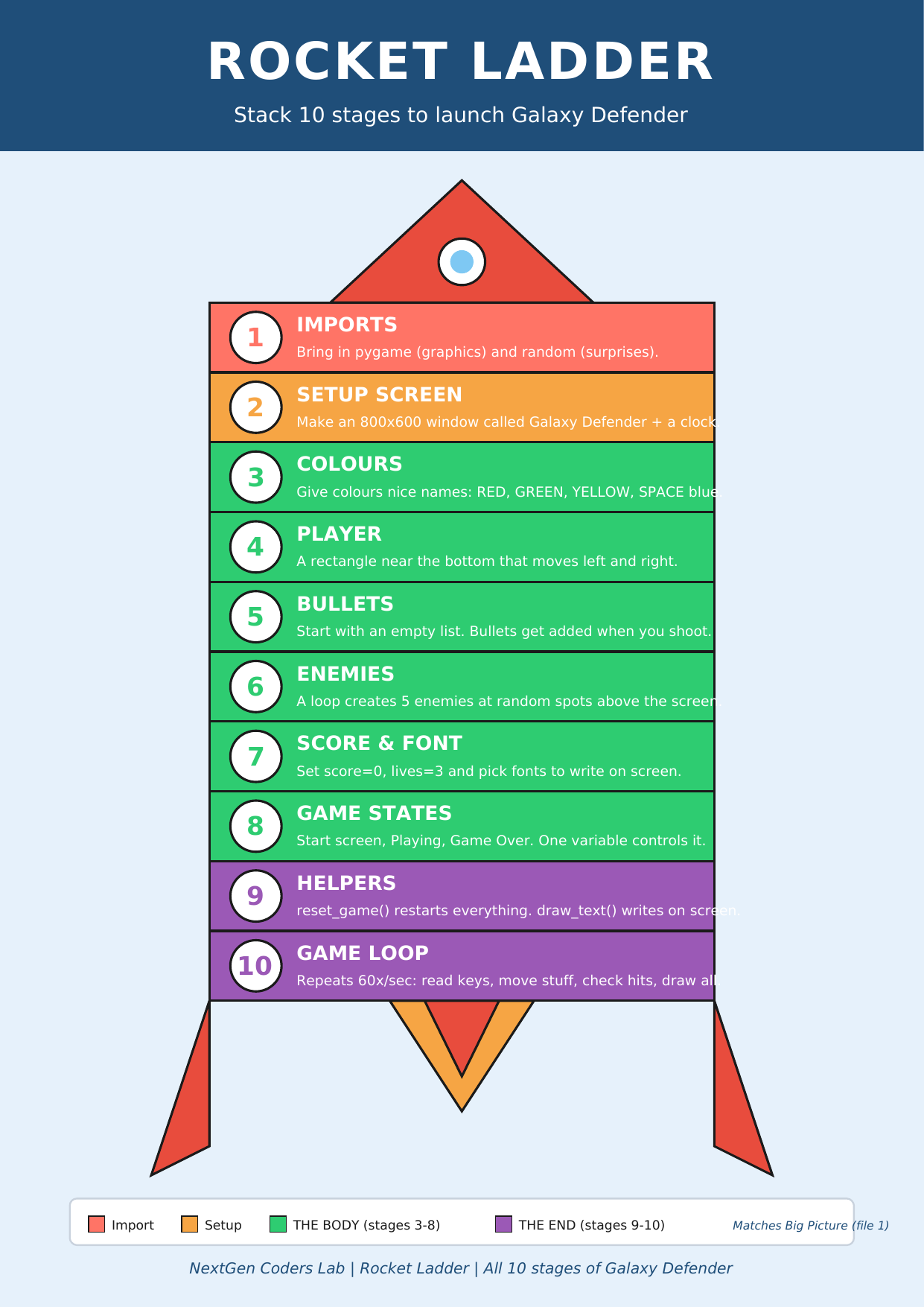
Where we are on the rocket
 ▶
◀
▶
◀
You're on Stage 10 of 10. 🎉 The top of the rocket!
What IS a game loop?
Think of your heart. It doesn't beat once and stop — it beats over and over, all day, every day, doing the same job (push blood, rest, push, rest). A game does the same thing: the screen redraws over and over, doing the same job each frame.
In Python it looks like this:
running = True
while running:        # repeat this block FOREVER until running becomes False
    ...               # do everything for one frame here
    clock.tick(60)    # then wait so we run at exactly 60 frames per second
💡 60 frames per second is the magic number. Below 30, motion looks jerky.
Above 60 doesn't help much on most screens. clock.tick(60)
does the maths so we hit 60 exactly, even on slow computers.
The six things every frame does
Inside the loop, the work splits into the same six phases every frame. Every stage you've built so far slots into one of these phases:
- EVENTS — has the player clicked the close button? Pressed SPACE? Moved the mouse? (Stage 5)
- KEYS — which arrows are being held right now? (Stage 4)
- UPDATE — move bullets up, slide enemies down, change positions. (Stages 5–6)
- COLLISIONS — did a bullet hit an enemy? Did an enemy reach the player? (Stages 6–8)
- DRAW — paint the background, the player, the bullets, the enemies, the score. (Stages 2–7)
- FLIP + TICK — show the new frame on the screen and wait so we run at 60 fps.
🎯 The order matters. If you draw before updating, you'll always be one frame behind. If you flip before drawing, you'll see a blank screen.
The two magic lines at the end
pygame.display.flip()    # "I'm done drawing — show the new frame now."
clock.tick(60)           # "Wait long enough so we run at 60 FPS."
Without flip(), all your drawing happens on
an invisible buffer — the player never sees it. Without
clock.tick(60), your game might run at 5000
FPS on a fast laptop (and look like a teleport) or 12 FPS on a slow one
(and look like a slideshow).
The COMPLETE Galaxy Defender 🚀
This is it. All 10 stages assembled. Read it slowly — every line maps to one of the stages you built. You wrote this!
# ─── Stage 1: imports ──────────────────────────────────
import pygame
import random

# ─── Stage 2: setup the screen ─────────────────────────
pygame.init()
WIDTH, HEIGHT = 800, 600
screen = pygame.display.set_mode((WIDTH, HEIGHT))
pygame.display.set_caption("Galaxy Defender")
clock = pygame.time.Clock()

# ─── Stage 3: colours ──────────────────────────────────
YELLOW, RED, WHITE, SPACE = (255,215,0), (255,0,0), (255,255,255), (0,0,50)

# ─── Stage 4: player ───────────────────────────────────
player = pygame.Rect(370, 520, 60, 40)
player_speed = 5

# ─── Stage 5: bullets ──────────────────────────────────
bullets = []
bullet_speed = 10

# ─── Stage 6: enemies ──────────────────────────────────
enemies = []
enemy_speed = 2
for i in range(5):
    enemies.append(pygame.Rect(random.randint(0, WIDTH - 50),
                               random.randint(-300, 0), 50, 50))

# ─── Stage 7: score + font ─────────────────────────────
score, lives = 0, 3
font     = pygame.font.SysFont("Arial", 32)
big_font = pygame.font.SysFont("Arial", 72)

# ─── Stage 8: game states ──────────────────────────────
state = "MENU"

# ─── Stage 9: helpers (text + cartoon sprites) ─────────
def draw_text(text, x, y, color=WHITE, big=False):
    f = big_font if big else font
    screen.blit(f.render(text, True, color), (x, y))

def draw_ship(x, y):
    pygame.draw.polygon(screen, (0, 230, 100),
        [(x+30,y),(x+60,y+40),(x+40,y+30),(x+20,y+30),(x,y+40)])
    pygame.draw.circle (screen, (100, 200, 255), (x+30, y+18), 6)
    pygame.draw.polygon(screen, (255, 100, 0), [(x+25,y+30),(x+35,y+30),(x+30,y+42)])

def draw_laser(b):
    pygame.draw.ellipse(screen, (255, 100, 0), (b.x-3, b.y-5, b.width+6, b.height+10))
    pygame.draw.ellipse(screen, (255, 220, 0), b)

def draw_alien(e):
    cx, cy = e.x + 25, e.y + 25
    pygame.draw.ellipse(screen, (200, 50, 200), (e.x, e.y+10, 50, 30))
    pygame.draw.ellipse(screen, (200, 50, 200), (e.x+10, e.y, 30, 20))
    pygame.draw.circle (screen, WHITE,          (cx-7, cy-8), 5)
    pygame.draw.circle (screen, WHITE,          (cx+7, cy-8), 5)
    pygame.draw.circle (screen, (0, 0, 0),      (cx-7, cy-8), 2)
    pygame.draw.circle (screen, (0, 0, 0),      (cx+7, cy-8), 2)

stars = [(random.randint(0, WIDTH), random.randint(0, HEIGHT),
          random.randint(1, 2)) for _ in range(80)]
def draw_stars():
    for sx, sy, sz in stars:
        pygame.draw.circle(screen, WHITE, (sx, sy), sz)

def reset_game():
    global score, lives, bullets
    score, lives, bullets = 0, 3, []
    player.x = 370
    for e in enemies:
        e.y = random.randint(-300, -50)
        e.x = random.randint(0, WIDTH - 50)

# ─── Stage 10: the GAME LOOP ───────────────────────────
running = True
while running:
    # 1. EVENTS
    for event in pygame.event.get():
        if event.type == pygame.QUIT:
            running = False
        if event.type == pygame.KEYDOWN:
            if state == "MENU" and event.key == pygame.K_SPACE:
                state = "PLAYING"
            elif state == "PLAYING" and event.key == pygame.K_SPACE:
                bullets.append(pygame.Rect(player.x + 27, player.y, 6, 15))
            elif state == "GAME_OVER" and event.key == pygame.K_r:
                reset_game()
                state = "PLAYING"

    keys = pygame.key.get_pressed()
    screen.fill(SPACE)
    draw_stars()                              # 🌌 starry background

    if state == "MENU":
        draw_text("GALAXY DEFENDER", WIDTH//2 - 260, 220, color=YELLOW, big=True)
        draw_text("Press SPACE to start", WIDTH//2 - 120, 320)

    elif state == "PLAYING":
        # 2. KEYS
        if keys[pygame.K_LEFT]  and player.x > 0:           player.x -= player_speed
        if keys[pygame.K_RIGHT] and player.x < WIDTH - 60:  player.x += player_speed

        # 3. UPDATE
        for b in bullets[:]:
            b.y -= bullet_speed
            if b.y < 0: bullets.remove(b)
        for e in enemies:
            e.y += enemy_speed
            if e.y > HEIGHT:
                e.y = random.randint(-200, -50); e.x = random.randint(0, WIDTH - 50)
                lives -= 1
                if lives <= 0: state = "GAME_OVER"

        # 4. COLLISIONS
        for b in bullets[:]:
            for e in enemies:
                if b.colliderect(e):
                    if b in bullets: bullets.remove(b)
                    e.y = random.randint(-200, -50); e.x = random.randint(0, WIDTH - 50)
                    score += 1

        # 5. DRAW
        draw_ship(player.x, player.y)            # 🚀
        for b in bullets: draw_laser(b)           # ✨
        for e in enemies: draw_alien(e)           # 👾
        draw_text("Score: " + str(score), 10, 10)
        draw_text("Lives: " + str(lives), WIDTH - 130, 10)

    elif state == "GAME_OVER":
        draw_text("GAME OVER", WIDTH//2 - 180, 200, color=RED, big=True)
        draw_text("Final score: " + str(score), WIDTH//2 - 110, 300)
        draw_text("Press R to play again",      WIDTH//2 - 130, 350, color=YELLOW)

    # 6. FLIP + TICK
    pygame.display.flip()
    clock.tick(60)

pygame.quit()
Run it. You have a title screen, a working space shooter, score, lives, and a game-over screen. You built a real game. 🏆
🎮 Want to play with more code? Scroll down to the Lesson 10 Code Library (6 game-loop programs). Copy any program, paste it into the editor below, and press the green ▶ Run button.
Type the code into this in-browser editor and press Run
Type the code above into the editor, then click ▶ Run.
🏆 Final challenges — make it YOUR game
- Speed it up. Try
clock.tick(120). Nowclock.tick(15). Feel the difference. - WIN screen. Add a fourth state
"WIN"that triggers whenscore >= 30. Show "YOU SAVED THE GALAXY!" in green. - Theme swap. Change the colours, the title, the alien shape (try circles instead of rectangles). Make it look NOTHING like the original.
- Difficulty. Speed up enemies by 1 every 10 points (
if score % 10 == 0: enemy_speed += 1). - Take a screenshot of your finished game and share it. You earned it. 📸
🎓 You finished Galaxy Defender
Look back at the Rocket Ladder. Stage 1 was just import pygame.
Stage 10 is a complete, polished, playable arcade game with menus, score,
lives, collisions, and a 60-frames-per-second heartbeat. You wrote
every line.
The big skills you now own — for life:
- Variables, lists, loops, conditions, functions
- Reading keyboard input, drawing shapes and text
- Game states, collision detection, animation
- Refactoring repeated code into helpers
- Debugging when something doesn't work the first time
These are the same building blocks behind every 2D game you've ever loved. Now go remix it — make a maze game, a racing game, a platformer. The rocket framework works for all of them. 🚀
Handouts for this lesson
Print these, keep them open in another tab, or download them to your computer.
📚 Lesson 10 Code Library — 6 final pygame programs about the game loop, FPS, and the full Galaxy Defender: Heartbeat, One Square Animation, The Six Phases, FPS Demo, Two Loops One Window, The Complete Galaxy Defender.
📄 Lesson 10 Code Library (6 game-loop programs) 🎨 Sprite Bonus (visual polish) 📄 Lesson 9 Code Library 📄 Lesson 8 Code Library 📄 Lesson 7 Code Library 📄 Lesson 6 Code Library 📄 Lesson 5 Code Library 📄 Lesson 4 Code Library 📄 Lesson 3 Code Library 📄 Lesson 2 Code Library 📄 Lesson 1 Code Library
🗺️ The big-picture handouts — frame them, you earned it.
📄 Big Picture 📄 Galaxy Map 📄 Rocket Ladder 📄 Code Recipe 📄 ALL Infographics (one PDF) 🖼️ 6 Parts of a Turtle Program
🤖 What next? Ask an AI like Claude or ChatGPT for a brand-new game idea using the same framework — "Give me a simple pygame maze game I can build using imports, screen setup, player, and a game loop". Paste the code into the Trinket above and remix away.