Score & Font — keep score, show it on screen
In Stage 6 you made bullets vanish enemies. Cool — but how many did you zap? In Stage 7 we'll count the hits with a score variable, then use pygame fonts to draw that number right on the screen.
🧠 Quick Recap (30 seconds)
Before we dive in — can you remember from Lesson 6 (Enemies)?
Q1. How do we create 5 enemies in one go?
A for loop: for i in range(5): enemies.append(pygame.Rect(...)). Change 5 to 50 and you have 50 enemies — same code.
Q2. Why do we "recycle" enemies instead of removing them?
Treadmill pattern. When an alien hits the bottom, we just send it back to the top at a new random spot. The list stays the same size but the action never stops.
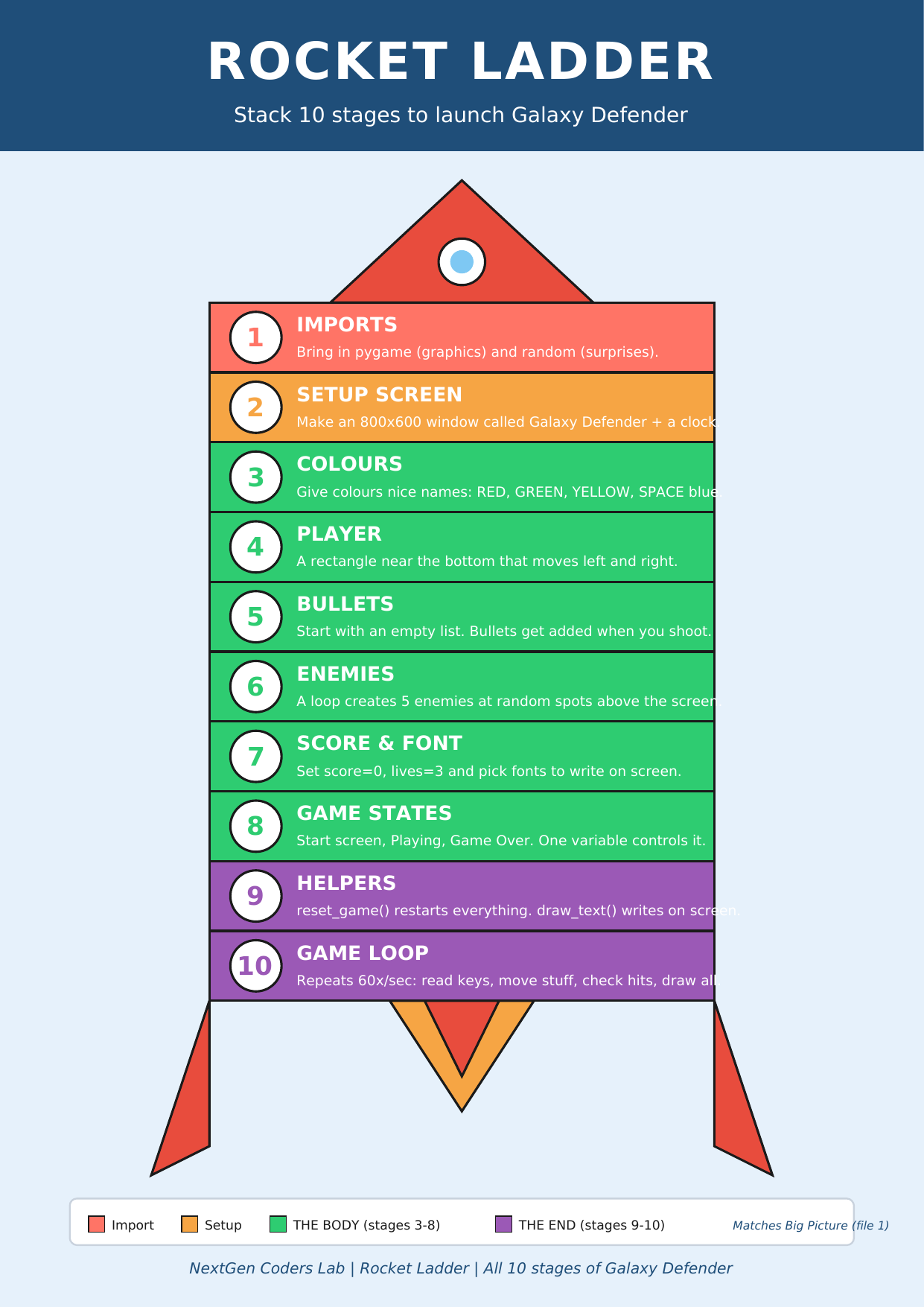
Where we are on the rocket
 ▶
◀
▶
◀
You're on Stage 7 of 10. Welcome to the END of the rocket — the polish stages!
A score is just a number that grows
A "score" sounds fancy, but it's just a variable that starts at
0 and gets + 1
every time something good happens (like a bullet hitting an alien).
score = 0           # start of the game

# ...later, inside the collision check...
score += 1          # short for: score = score + 1
💡 += is called plus-equals.
It's how Python programmers say "add this to what's already there."
You'll use it everywhere in games — for score, lives, ammo, levels.
Drawing text with pygame.font
pygame can't just print text on the screen like the Python console — it has to draw it like a picture. That takes three steps:
- Pick a font and size.
font = pygame.font.SysFont("Arial", 32) - Render the text into an image.
text_img = font.render("Score: 5", True, WHITE) - Blit (paste) that image onto the screen.
screen.blit(text_img, (10, 10))
🖼️ .blit() is pygame's word for "paste this image
at these coordinates." The True in
.render() turns on smoothing so the letters
look nice and not pixelated.
Showing a live score
Here's the trick: we make the font once at the top (fonts are slow to create), but we re-render the text every frame because the number keeps changing.
WHITE = (255, 255, 255)
font  = pygame.font.SysFont("Arial", 32)   # do this ONCE, near the top

# ...inside the game loop, after screen.fill(SPACE)...
score_img = font.render("Score: " + str(score), True, WHITE)
screen.blit(score_img, (10, 10))           # top-left corner
🔢 str(score) turns the number into text so
we can glue it onto "Score: " with
+. If you forget str(),
Python will yell "can't add str + int" — that's its way of saying
"words and numbers don't mix."
The code so far
# Stages 1–6 already in place...
import pygame
import random

pygame.init()
WIDTH, HEIGHT = 800, 600
screen = pygame.display.set_mode((WIDTH, HEIGHT))
pygame.display.set_caption("Galaxy Defender")
clock = pygame.time.Clock()

YELLOW = (255, 215, 0)
RED    = (255, 0, 0)
WHITE  = (255, 255, 255)
SPACE  = (0, 0, 50)

# 🚀 Cartoon ship + ✨ fiery laser (from L5 + L6)
def draw_ship(s, x, y):
    pygame.draw.polygon(s, (0, 230, 100),
        [(x+30,y),(x+60,y+40),(x+40,y+30),(x+20,y+30),(x,y+40)])
    pygame.draw.circle (s, (100, 200, 255), (x+30, y+18), 6)
    pygame.draw.polygon(s, (255, 100, 0), [(x+25,y+30),(x+35,y+30),(x+30,y+42)])

def draw_laser(s, b):
    pygame.draw.ellipse(s, (255, 100, 0), (b.x-3, b.y-5, b.width+6, b.height+10))
    pygame.draw.ellipse(s, (255, 220, 0), b)

# 👾 Cartoon alien (new this lesson!)
def draw_alien(s, e):
    cx, cy = e.x + 25, e.y + 25
    pygame.draw.ellipse(s, (200, 50, 200), (e.x, e.y+10, 50, 30))     # body dome
    pygame.draw.ellipse(s, (200, 50, 200), (e.x+10, e.y, 30, 20))     # head
    pygame.draw.circle (s, WHITE,          (cx-7, cy-8), 5)            # eye whites
    pygame.draw.circle (s, WHITE,          (cx+7, cy-8), 5)
    pygame.draw.circle (s, (0, 0, 0),      (cx-7, cy-8), 2)            # pupils
    pygame.draw.circle (s, (0, 0, 0),      (cx+7, cy-8), 2)

player = pygame.Rect(370, 520, 60, 40)
player_speed = 5

bullets = []
bullet_speed = 10

enemies = []
enemy_speed = 2
for i in range(5):
    e = pygame.Rect(random.randint(0, WIDTH - 50),
                    random.randint(-300, 0),
                    50, 50)
    enemies.append(e)

# Stage 7 — Score & Font ✨
score = 0
font  = pygame.font.SysFont("Arial", 32)

running = True
while running:
    for event in pygame.event.get():
        if event.type == pygame.QUIT:
            running = False
        if event.type == pygame.KEYDOWN and event.key == pygame.K_SPACE:
            bullets.append(pygame.Rect(player.x + 27, player.y, 6, 15))

    keys = pygame.key.get_pressed()
    if keys[pygame.K_LEFT]  and player.x > 0:
        player.x -= player_speed
    if keys[pygame.K_RIGHT] and player.x < WIDTH - 60:
        player.x += player_speed

    # move bullets
    for b in bullets[:]:
        b.y -= bullet_speed
        if b.y < 0:
            bullets.remove(b)

    # move + recycle enemies
    for e in enemies:
        e.y += enemy_speed
        if e.y > HEIGHT:
            e.y = random.randint(-200, -50)
            e.x = random.randint(0, WIDTH - 50)

    # collisions — now they count!
    for b in bullets[:]:
        for e in enemies:
            if b.colliderect(e):
                if b in bullets:
                    bullets.remove(b)
                e.y = random.randint(-200, -50)
                e.x = random.randint(0, WIDTH - 50)
                score += 1                            # 🎯 +1 per hit

    # draw everything
    screen.fill(SPACE)
    draw_ship(screen, player.x, player.y)    # 🚀
    for b in bullets:
        draw_laser(screen, b)                 # ✨
    for e in enemies:
        draw_alien(screen, e)                 # 👾

    # draw the score on top
    score_img = font.render("Score: " + str(score), True, WHITE)
    screen.blit(score_img, (10, 10))

    pygame.display.flip()
    clock.tick(60)

pygame.quit()
Run it. Top-left of the screen now shows Score: 0, and every time you zap an alien the number ticks up. You just built a real, scoring arcade game. 🏆
🎮 Want to play with more code? Scroll down to the Lesson 7 Code Library (6 score & font games). Copy any program, paste it into the editor below, and press the green ▶ Run button.
Type the code into this in-browser editor and press Run
Type the code above into the editor, then click ▶ Run.
🏆 Mini-challenges
- Bigger score: change
SysFont("Arial", 32)toSysFont("Arial", 64)for a giant scoreboard. - Change colour: swap
WHITEforYELLOWin thefont.render(...)line. - +10 per hit: change
score += 1toscore += 10. - Top-right instead: change the blit position from
(10, 10)to(WIDTH - 180, 10). - Show a high score too: add a second variable
high = 0and update it withif score > high: high = score. Render it on a second line.
Handouts for this lesson
Print these, keep them open in another tab, or download them to your computer.
📚 Lesson 7 Code Library — 6 brand-new pygame mini-games all about scoring, fonts, and on-screen text: Click Counter, Score on Hit, Big Bold Number, Two-Line Scoreboard, Colour-Changing Score, High Score Tracker.
📄 Lesson 7 Code Library (6 score & font games) 🎨 Sprite Bonus (visual polish) 📄 Lesson 6 Code Library 📄 Lesson 5 Code Library 📄 Lesson 4 Code Library 📄 Lesson 3 Code Library 📄 Lesson 2 Code Library 📄 Lesson 1 Code Library
🗺️ The big-picture handouts — keep these by your side for the whole course.
📄 Rocket Ladder 📄 Code Recipe 📄 Pixel Cheat Sheet 📄 Code Comic 🖼️ 6 Parts of a Turtle Program
🤖 Want to try your own idea? Ask an AI like Claude or ChatGPT something like "Write me a short pygame program that shows a score in the top-left corner using pygame.font", then paste the code into the Trinket above and click Run.