Helpers — give your code superpowers
Look at our Galaxy Defender code. Notice anything? We do the same things over and over — render text, place a new enemy, reset the game. In Stage 9 we turn those repeated chunks into helper functions: tiny named blocks of code you write once and use everywhere.
🧠 Quick Recap (30 seconds)
Before we dive in — can you remember from Lesson 8 (Game States)?
Q1. What is a "state" in a game?
The current mood of the game: MENU, PLAYING, GAME_OVER. The same code behaves differently depending on which state it's in.
Q2. How do you switch between states?
Just change the variable: state = "PLAYING". Next frame, the if / elif block runs the new mood's code.
Where we are on the rocket
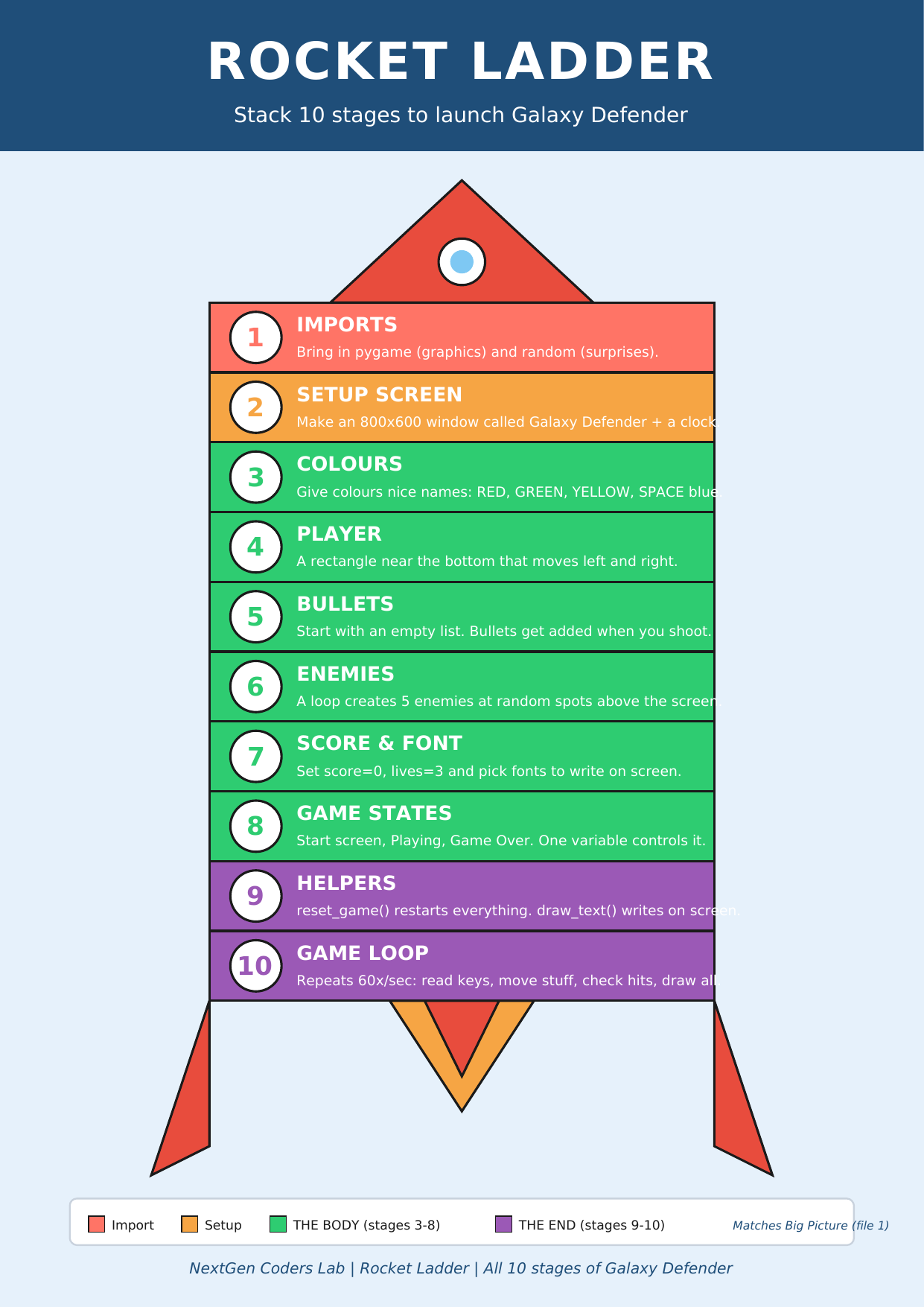 ▶
◀
▶
◀
You're on Stage 9 of 10. One more polish stage and Galaxy Defender is done!
A function is just a recipe with a name
Imagine you make pancakes every Sunday. Each week you grab the eggs, mix the flour, heat the pan, flip, plate up. After a few months, you stop explaining the steps — you just say "make pancakes." Everyone knows what that means.
A function in Python works the same way. You name a chunk of code once, and from then on you call it by name. Less typing. Less mistakes. Easier to read.
def greet():                          # "def" = "I'm defining a new recipe"
    print("Hello, pilot!")            # the steps of the recipe

greet()                               # cooking it: call the function
greet()                               # call it as many times as you want!
greet()
💡 The colon and the indentation are how Python knows what's inside the function and what's outside. Get the indenting right and Python is happy.
Parameters — pass it some ingredients
Most recipes need ingredients. In a function, ingredients are called parameters. You write them in the parentheses:
def greet(name):                      # "name" is the parameter
    print("Hello, " + name + "!")

greet("Aisha")                        # → Hello, Aisha!
greet("Tomi")                         # → Hello, Tomi!
You can also give parameters a default value, used when the caller doesn't pass one in:
def greet(name="pilot"):
    print("Hello, " + name + "!")

greet()           # → Hello, pilot!     (uses default)
greet("Aisha")    # → Hello, Aisha!     (overrides default)
Two helpers that change everything
1. draw_text(...) — write on the screen in one line
We've been writing three lines every time we wanted to show a number (pick a font, render an image, blit it). Let's wrap those three lines into one helper:
def draw_text(text, x, y, color=WHITE, big=False):
    f = big_font if big else font
    img = f.render(text, True, color)
    screen.blit(img, (x, y))
Now anywhere in the game we can just write:
draw_text("Score: " + str(score), 10, 10)
draw_text("Lives: " + str(lives), WIDTH - 130, 10)
draw_text("GAME OVER", 240, 240, color=RED, big=True)
2. reset_game() — start a fresh round
When the player presses R after losing, we need to reset score, lives, bullets, enemies… that's a LOT of code to repeat. Stick it in a function once and call it whenever we need a fresh game:
def reset_game():
    global score, lives, bullets
    score   = 0
    lives   = 3
    bullets = []
    player.x = 370
    for e in enemies:
        e.y = random.randint(-300, -50)
        e.x = random.randint(0, WIDTH - 50)

# now in the game loop:
if keys[pygame.K_r] and state == "GAME_OVER":
    reset_game()
    state = "PLAYING"
🌐 The word global tells Python: "when I say
score = 0 in here, I mean the main
score variable, not a brand-new one trapped inside
this function." Without it, the change would only exist inside the function.
Why bother with helpers?
- Less typing. Three lines of text-drawing become one.
- Less repetition. If you want to change how text looks, you change it in ONE place.
- Easier to read.
reset_game()tells the reader the intent. The raw code doesn't. - Easier to debug. Bug in the score reset? You only have one place to look.
Professional programmers call this DRY — "Don't Repeat Yourself." It's one of the biggest jumps in coding maturity. Welcome up. 🚀
The code so far
# Stages 1–8 already in place...
import pygame
import random

pygame.init()
WIDTH, HEIGHT = 800, 600
screen = pygame.display.set_mode((WIDTH, HEIGHT))
pygame.display.set_caption("Galaxy Defender")
clock = pygame.time.Clock()

YELLOW = (255, 215, 0)
RED    = (255, 0, 0)
WHITE  = (255, 255, 255)
SPACE  = (0, 0, 50)

player = pygame.Rect(370, 520, 60, 40)
player_speed = 5

bullets = []
bullet_speed = 10

enemies = []
enemy_speed = 2
for i in range(5):
    enemies.append(pygame.Rect(random.randint(0, WIDTH - 50),
                               random.randint(-300, 0), 50, 50))

score = 0
lives = 3
font     = pygame.font.SysFont("Arial", 32)
big_font = pygame.font.SysFont("Arial", 72)

state = "MENU"

# Stage 9 — ALL THE HELPER FUNCTIONS ✨
# (the sprite helpers we sneak-previewed in L5–L8 are now formal helpers)

def draw_text(text, x, y, color=WHITE, big=False):
    f = big_font if big else font
    screen.blit(f.render(text, True, color), (x, y))

def draw_ship(x, y):
    pygame.draw.polygon(screen, (0, 230, 100),
        [(x+30,y),(x+60,y+40),(x+40,y+30),(x+20,y+30),(x,y+40)])
    pygame.draw.circle (screen, (100, 200, 255), (x+30, y+18), 6)
    pygame.draw.polygon(screen, (255, 100, 0), [(x+25,y+30),(x+35,y+30),(x+30,y+42)])

def draw_laser(b):
    pygame.draw.ellipse(screen, (255, 100, 0), (b.x-3, b.y-5, b.width+6, b.height+10))
    pygame.draw.ellipse(screen, (255, 220, 0), b)

def draw_alien(e):
    cx, cy = e.x + 25, e.y + 25
    pygame.draw.ellipse(screen, (200, 50, 200), (e.x, e.y+10, 50, 30))
    pygame.draw.ellipse(screen, (200, 50, 200), (e.x+10, e.y, 30, 20))
    pygame.draw.circle (screen, WHITE,          (cx-7, cy-8), 5)
    pygame.draw.circle (screen, WHITE,          (cx+7, cy-8), 5)
    pygame.draw.circle (screen, (0, 0, 0),      (cx-7, cy-8), 2)
    pygame.draw.circle (screen, (0, 0, 0),      (cx+7, cy-8), 2)

stars = [(random.randint(0, WIDTH), random.randint(0, HEIGHT),
          random.randint(1, 2)) for _ in range(80)]
def draw_stars():
    for sx, sy, sz in stars:
        pygame.draw.circle(screen, WHITE, (sx, sy), sz)

def reset_game():
    global score, lives, bullets
    score   = 0
    lives   = 3
    bullets = []
    player.x = 370
    for e in enemies:
        e.y = random.randint(-300, -50)
        e.x = random.randint(0, WIDTH - 50)

running = True
while running:
    for event in pygame.event.get():
        if event.type == pygame.QUIT:
            running = False
        if event.type == pygame.KEYDOWN and event.key == pygame.K_SPACE \
           and state == "PLAYING":
            bullets.append(pygame.Rect(player.x + 27, player.y, 6, 15))

    keys = pygame.key.get_pressed()
    screen.fill(SPACE)
    draw_stars()                              # 🌌 painted on every screen

    if state == "MENU":
        draw_text("GALAXY DEFENDER", WIDTH//2 - 260, 220, color=YELLOW, big=True)
        draw_text("Press SPACE to start", WIDTH//2 - 120, 320)
        if keys[pygame.K_SPACE]:
            state = "PLAYING"

    elif state == "PLAYING":
        if keys[pygame.K_LEFT]  and player.x > 0:           player.x -= player_speed
        if keys[pygame.K_RIGHT] and player.x < WIDTH - 60:  player.x += player_speed

        for b in bullets[:]:
            b.y -= bullet_speed
            if b.y < 0: bullets.remove(b)

        for e in enemies:
            e.y += enemy_speed
            if e.y > HEIGHT:
                e.y = random.randint(-200, -50)
                e.x = random.randint(0, WIDTH - 50)
                lives -= 1
                if lives <= 0: state = "GAME_OVER"

        for b in bullets[:]:
            for e in enemies:
                if b.colliderect(e):
                    if b in bullets: bullets.remove(b)
                    e.y = random.randint(-200, -50)
                    e.x = random.randint(0, WIDTH - 50)
                    score += 1

        draw_ship(player.x, player.y)            # 🚀
        for b in bullets: draw_laser(b)           # ✨
        for e in enemies: draw_alien(e)           # 👾

        draw_text("Score: " + str(score), 10, 10)
        draw_text("Lives: " + str(lives), WIDTH - 130, 10)

    elif state == "GAME_OVER":
        draw_text("GAME OVER",  WIDTH//2 - 180, 200, color=RED, big=True)
        draw_text("Final score: " + str(score), WIDTH//2 - 110, 300)
        draw_text("Press R to play again",       WIDTH//2 - 130, 350, color=YELLOW)
        if keys[pygame.K_r]:
            reset_game()
            state = "PLAYING"

    pygame.display.flip()
    clock.tick(60)

pygame.quit()
Look how clean the loop is now! Every draw_text(...)
is one line. The whole reset is one line: reset_game().
Same game, half the noise. 🧹
🎮 Want to play with more code? Scroll down to the Lesson 9 Code Library (6 helper games). Copy any program, paste it into the editor below, and press the green ▶ Run button.
Type the code into this in-browser editor and press Run
Type the code above into the editor, then click ▶ Run.
🏆 Mini-challenges
- New helper: write
def spawn_enemy():that returns a brand-new pygame.Rect with random position. Use it in the setup loop. - Cleaner collision: wrap the bullet-vs-enemy loop in a function called
def check_hits():. Useglobal scoreinside. - Default colour: change
draw_textto default toYELLOWinstead ofWHITE. - Centred text: add a parameter
center=Falsetodraw_textthat centres the image when True.
Handouts for this lesson
Print these, keep them open in another tab, or download them to your computer.
📚 Lesson 9 Code Library — 6 brand-new pygame mini-games all about helper functions: Hello Function, Greet with a Name, draw_text Helper, Reset Helper, Spawn Enemy Helper, Mini Defender with Helpers.
📄 Lesson 9 Code Library (6 helper games) 🎨 Sprite Bonus (visual polish) 📄 Lesson 8 Code Library 📄 Lesson 7 Code Library 📄 Lesson 6 Code Library 📄 Lesson 5 Code Library 📄 Lesson 4 Code Library 📄 Lesson 3 Code Library 📄 Lesson 2 Code Library 📄 Lesson 1 Code Library
🗺️ The big-picture handouts — keep these by your side for the whole course.
📄 Rocket Ladder 📄 Code Superheroes 📄 Code Recipe 📄 Pixel Cheat Sheet 🖼️ 6 Parts of a Turtle Program
🤖 Want to try your own idea? Ask an AI like Claude or ChatGPT something like "Write me a short pygame program with a helper function that draws text in any colour at any position", then paste the code into the Trinket above and click Run.