Game States — start screen, playing, game over
In Stage 7 you counted hits with a score. But right now your game never ends — aliens just keep coming forever. In Stage 8 we'll teach the game how to behave differently depending on what's happening, using a state variable: MENU, PLAYING, and GAME OVER.
🧠 Quick Recap (30 seconds)
Before we dive in — can you remember from Lesson 7 (Score & Font)?
Q1. How do we draw text in pygame?
Three steps: pick a font (pygame.font.SysFont), render the text into an image (font.render), then blit it onto the screen (screen.blit).
Q2. Why do we wrap the score in str() when displaying it?
Because Python won't let you add text + number directly. "Score: " + score would crash. str(score) turns the number into text first, then they can be joined.
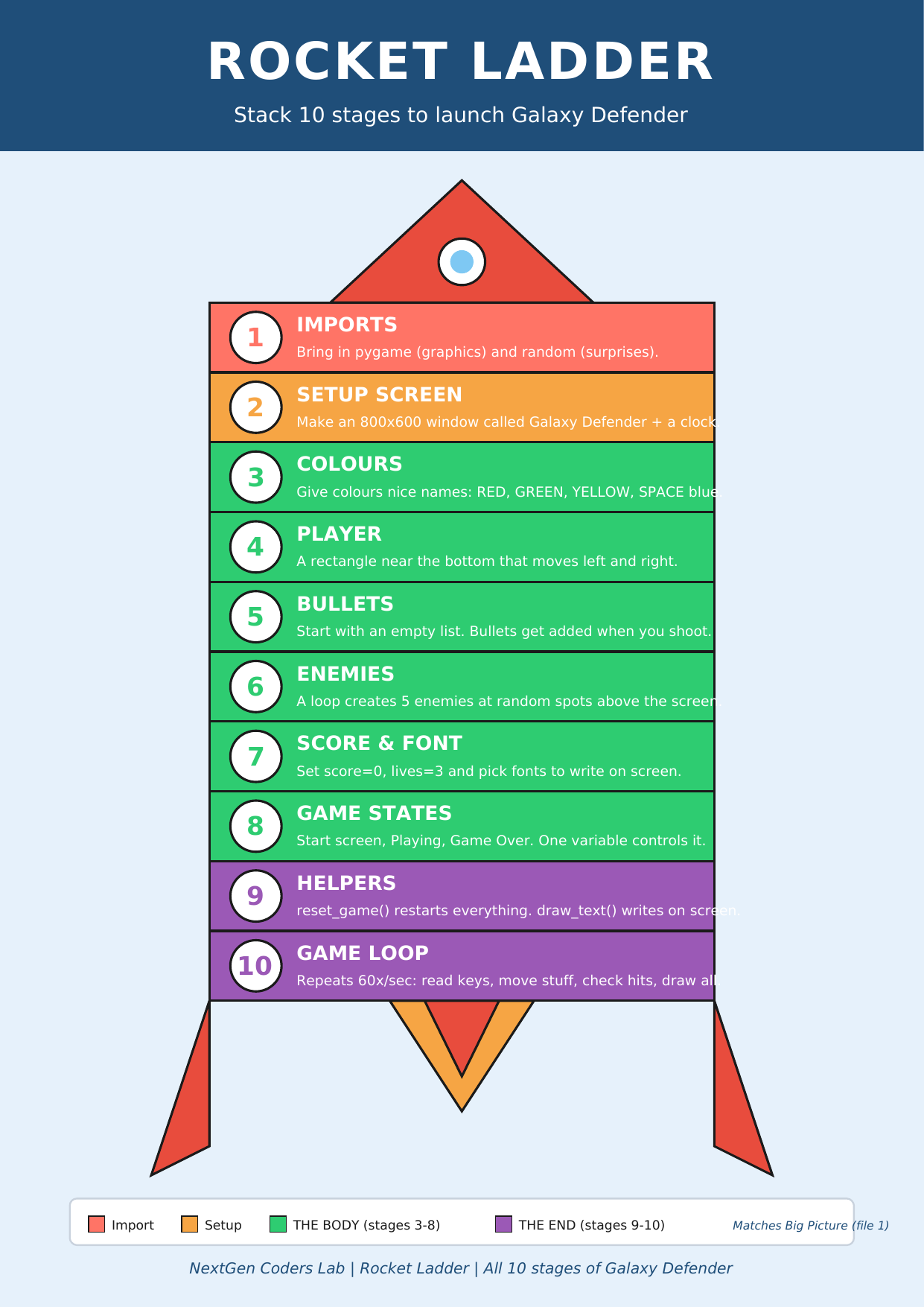
Where we are on the rocket
 ▶
◀
▶
◀
You're on Stage 8 of 10. Two polish stages to go — your game is almost a real game!
A "state" is just the mood the game is in
Think about your phone. When the screen is locked, swiping doesn't open apps. When it's unlocked, swiping does. Same finger, same screen — different state. Games work exactly the same way.
Galaxy Defender will have three moods:
- MENU — title screen. "Press SPACE to start."
- PLAYING — the normal game you already built.
- GAME_OVER — alien touched you. "Press R to try again."
💡 We'll store the current mood in a plain text variable called
state. Then the game loop just asks
"what state are we in?" and does the right thing.
One variable, three behaviours
At the top of the program we set the starting mood:
state = "MENU" # the game starts on the title screen
Then inside the game loop we use if /
elif to run different code depending on
what state currently is:
if state == "MENU":
    # show the title screen, wait for SPACE
    ...
elif state == "PLAYING":
    # move the player, bullets, enemies, check collisions
    ...
elif state == "GAME_OVER":
    # show "Game Over", wait for R to restart
    ...
🔀 elif means "else if" — Python checks each
line in order and only runs the first one that matches.
That's why exactly one mood runs per frame, never two.
How do we switch moods?
We just change the variable. That's it. The next frame the loop sees the new value and runs the new branch.
# in MENU — pressing SPACE starts the game
if keys[pygame.K_SPACE]:
    state = "PLAYING"

# in PLAYING — if an enemy touches the player, it's over
for e in enemies:
    if player.colliderect(e):
        state = "GAME_OVER"

# in GAME_OVER — pressing R resets the score and plays again
if keys[pygame.K_r]:
    score = 0
    state = "PLAYING"
🔁 Notice we set score = 0 on restart.
Without that, your old score would carry over — not exactly a fresh start!
The code so far
# Stages 1–7 already in place...
import pygame
import random

pygame.init()
WIDTH, HEIGHT = 800, 600
screen = pygame.display.set_mode((WIDTH, HEIGHT))
pygame.display.set_caption("Galaxy Defender")
clock = pygame.time.Clock()

YELLOW = (255, 215, 0)
RED    = (255, 0, 0)
WHITE  = (255, 255, 255)
SPACE  = (0, 0, 50)

# 🎨 Sprite helpers from L5–L7
def draw_ship(s, x, y):
    pygame.draw.polygon(s, (0, 230, 100),
        [(x+30,y),(x+60,y+40),(x+40,y+30),(x+20,y+30),(x,y+40)])
    pygame.draw.circle (s, (100, 200, 255), (x+30, y+18), 6)
    pygame.draw.polygon(s, (255, 100, 0), [(x+25,y+30),(x+35,y+30),(x+30,y+42)])

def draw_laser(s, b):
    pygame.draw.ellipse(s, (255, 100, 0), (b.x-3, b.y-5, b.width+6, b.height+10))
    pygame.draw.ellipse(s, (255, 220, 0), b)

def draw_alien(s, e):
    cx, cy = e.x + 25, e.y + 25
    pygame.draw.ellipse(s, (200, 50, 200), (e.x, e.y+10, 50, 30))
    pygame.draw.ellipse(s, (200, 50, 200), (e.x+10, e.y, 30, 20))
    pygame.draw.circle (s, WHITE,          (cx-7, cy-8), 5)
    pygame.draw.circle (s, WHITE,          (cx+7, cy-8), 5)
    pygame.draw.circle (s, (0, 0, 0),      (cx-7, cy-8), 2)
    pygame.draw.circle (s, (0, 0, 0),      (cx+7, cy-8), 2)

# 🌌 Starfield background (new this lesson — generate once, draw every frame)
stars = [(random.randint(0, WIDTH), random.randint(0, HEIGHT),
          random.randint(1, 2)) for _ in range(80)]
def draw_stars(s):
    for sx, sy, sz in stars:
        pygame.draw.circle(s, WHITE, (sx, sy), sz)

player = pygame.Rect(370, 520, 60, 40)
player_speed = 5

bullets = []
bullet_speed = 10

enemies = []
enemy_speed = 2
for i in range(5):
    e = pygame.Rect(random.randint(0, WIDTH - 50),
                    random.randint(-300, 0),
                    50, 50)
    enemies.append(e)

score = 0
font     = pygame.font.SysFont("Arial", 32)
big_font = pygame.font.SysFont("Arial", 64)

# Stage 8 — Game States ✨
state = "MENU"

running = True
while running:
    for event in pygame.event.get():
        if event.type == pygame.QUIT:
            running = False
        if event.type == pygame.KEYDOWN and event.key == pygame.K_SPACE:
            if state == "PLAYING":
                bullets.append(pygame.Rect(player.x + 27, player.y, 6, 15))

    keys = pygame.key.get_pressed()
    screen.fill(SPACE)
    draw_stars(screen)                        # 🌌 starry background on every screen

    # ── MENU ───────────────────────────────────────────────
    if state == "MENU":
        title = big_font.render("GALAXY DEFENDER", True, YELLOW)
        hint  = font.render("Press SPACE to start", True, WHITE)
        screen.blit(title, (WIDTH//2 - 260, 220))
        screen.blit(hint,  (WIDTH//2 - 120, 320))
        if keys[pygame.K_SPACE]:
            state = "PLAYING"

    # ── PLAYING ────────────────────────────────────────────
    elif state == "PLAYING":
        if keys[pygame.K_LEFT]  and player.x > 0:
            player.x -= player_speed
        if keys[pygame.K_RIGHT] and player.x < WIDTH - 60:
            player.x += player_speed

        for b in bullets[:]:
            b.y -= bullet_speed
            if b.y < 0:
                bullets.remove(b)

        for e in enemies:
            e.y += enemy_speed
            if e.y > HEIGHT:
                e.y = random.randint(-200, -50)
                e.x = random.randint(0, WIDTH - 50)
            if player.colliderect(e):         # 💥 alien touched the ship!
                state = "GAME_OVER"

        for b in bullets[:]:
            for e in enemies:
                if b.colliderect(e):
                    if b in bullets:
                        bullets.remove(b)
                    e.y = random.randint(-200, -50)
                    e.x = random.randint(0, WIDTH - 50)
                    score += 1

        draw_ship(screen, player.x, player.y)      # 🚀
        for b in bullets:
            draw_laser(screen, b)                   # ✨
        for e in enemies:
            draw_alien(screen, e)                   # 👾

        score_img = font.render("Score: " + str(score), True, WHITE)
        screen.blit(score_img, (10, 10))

    # ── GAME OVER ──────────────────────────────────────────
    elif state == "GAME_OVER":
        over = big_font.render("GAME OVER", True, RED)
        final = font.render("Final score: " + str(score), True, WHITE)
        hint  = font.render("Press R to play again", True, YELLOW)
        screen.blit(over,  (WIDTH//2 - 180, 200))
        screen.blit(final, (WIDTH//2 - 110, 290))
        screen.blit(hint,  (WIDTH//2 - 130, 340))
        if keys[pygame.K_r]:
            score = 0
            bullets.clear()
            for e in enemies:
                e.y = random.randint(-300, -50)
                e.x = random.randint(0, WIDTH - 50)
            state = "PLAYING"

    pygame.display.flip()
    clock.tick(60)

pygame.quit()
Run it. You start on a title screen. Press SPACE — the game begins. Get hit by an alien — "GAME OVER" appears. Press R — fresh start. You just built a complete arcade loop. 🕹️
🎮 Want to play with more code? Scroll down to the Lesson 8 Code Library (6 game-state mini-games). Copy any program, paste it into the editor below, and press the green ▶ Run button.
Type the code into this in-browser editor and press Run
Type the code above into the editor, then click ▶ Run.
🏆 Mini-challenges
- Win condition: add a fourth state
"WIN". Switch to it whenscore >= 20and show "YOU WIN!" in green. - 3 lives: add
lives = 3. Only switch to GAME_OVER whenliveshits 0. Subtract one per hit and recycle the alien. - Pause button: add a
"PAUSED"state. Press P during PLAYING to pause, P again to resume. - Better title: change
"GALAXY DEFENDER"on the menu to your own game name. - Countdown: when SPACE is pressed on the menu, show "3… 2… 1…" for one second each before switching to PLAYING. (Hint: use
pygame.time.get_ticks().)
Handouts for this lesson
Print these, keep them open in another tab, or download them to your computer.
📚 Lesson 8 Code Library — 6 brand-new pygame mini-games all about game states, menus, and game-over screens: Two-State Toggle, Menu & Play, Game Over Screen, Pause Button, Win Condition, Three Lives.
📄 Lesson 8 Code Library (6 game-state games) 🎨 Sprite Bonus (visual polish) 📄 Lesson 7 Code Library 📄 Lesson 6 Code Library 📄 Lesson 5 Code Library 📄 Lesson 4 Code Library 📄 Lesson 3 Code Library 📄 Lesson 2 Code Library 📄 Lesson 1 Code Library
🗺️ The big-picture handouts — keep these by your side for the whole course.
📄 Rocket Ladder 📄 Code Recipe 📄 Pixel Cheat Sheet 📄 Code Comic 🖼️ 6 Parts of a Turtle Program
🤖 Want to try your own idea? Ask an AI like Claude or ChatGPT something like "Write me a short pygame program that has a MENU state and a PLAYING state I can switch between with SPACE", then paste the code into the Trinket above and click Run.